<-

Training Documents
For Internal & External Processes

Medical Equipment

Skills used
Graphic Design
Technical Writing
Communication
PROGRAMS
Adobe InDesign
Adobe Illustrator
Microsoft Word
Adobe Acrobat
  • ABOUT THE DOCUMENTS

    MY EXPERIENCE

    I began working on training materials the moment I started working for a medical equipment company. I found that my knowledge of marketing, where the goal is to convey a message to diverse audiences, helped me with creating training content.

    When I work on training documents, I utilize my skills in technical writing and graphic design to ensure content is accurate, precise, and communicated in a visually pleasing way.

    View the training documents I have worked on below! 

My Creation Journey

Equipment Daily Use Guides

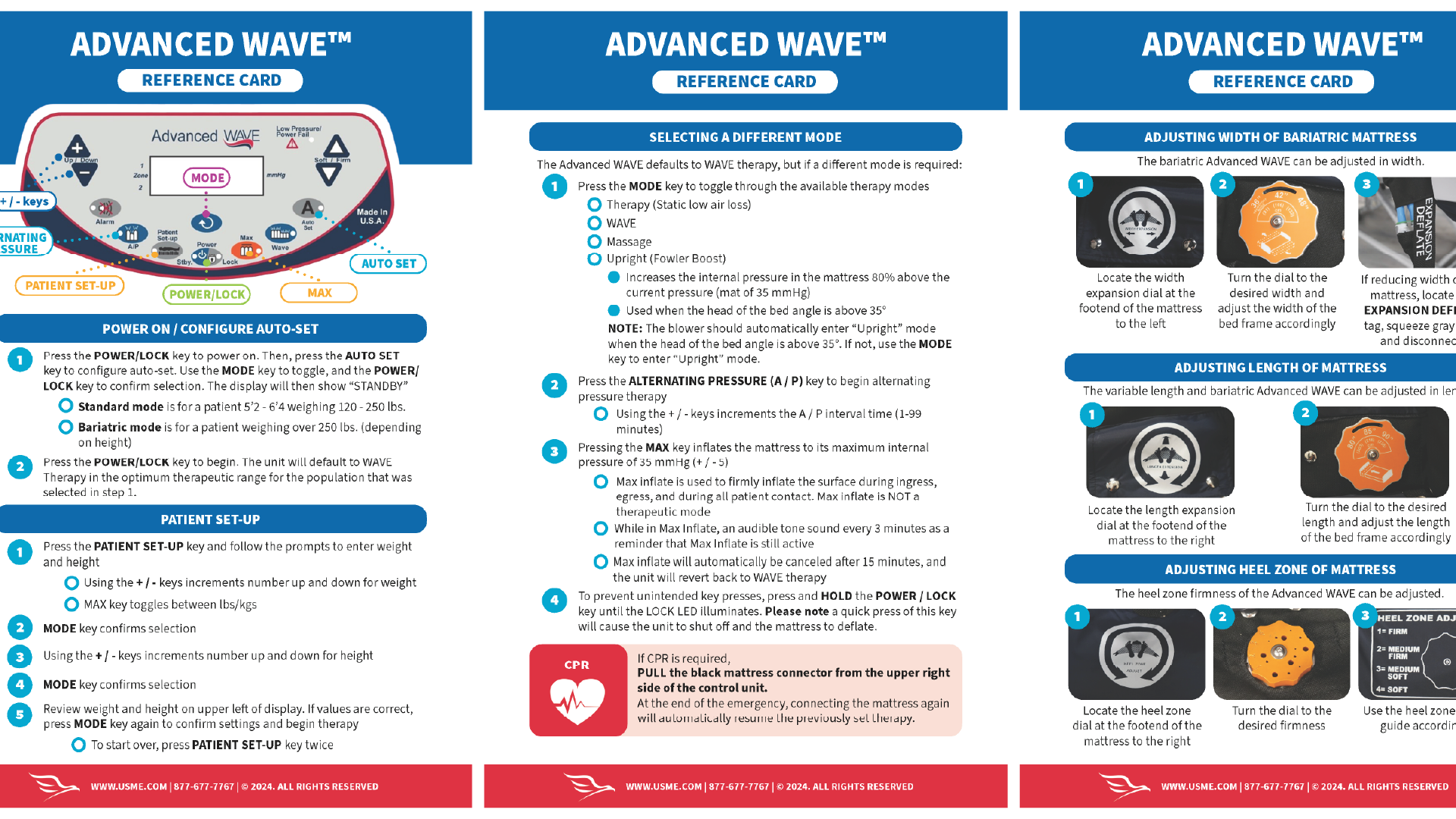
When providing medical equipment to hospitals, there is plenty of equipment that their staff will already know how to use. However, when we began pushing new bed products, many staff had never encountered this equipment before and did not know how to use it. With nurses always on the go and caring for multiple patients, it was crucial to provide them with training materials that were straightforward and simple.  

There were eight different pieces of equipment that needed guides, and this project needed to be completed quickly before more hospital systems began using our beds and struggled without proper training materials.

We had teams who would host video calls for hospital systems to train over equipment. Once our training materials were complete, it was reported that our customers decided they did not need the calls because our training materials were solid and their staff were doing well with the new equipment.

Process

1. To begin, my team worked with subject matter experts to define all the information needed for daily use of the equipment. This was created in a shared Word document.  

2. I gathered assets, such as images of the equipment and any icons, and created a layout of the training document in Adobe InDesign.

3. I created a draft of the document and sent it to my team and subject matter experts. In this step, we would determine if the information was being portrayed effectively and if we needed any additional photos.

4. Once approved, the final document is uploaded to a link that can easily be shared with hospital staff.

Equipment Parts Reference Guides

Some pieces of medical equipment have numerous parts by different manufacturers, and with equipment coming in and out of hospitals, it is easy to lose track of parts. Our company began facing this issue and losing money to lost equipment parts that had to regularly be replaced. The guide below was created in response to this issue:
View Document Reference PDF Example ➡
This guide was created with assistance from a subject matter expert and equipment technicians. They told me all of the parts for a particular unit and provided each one for photos. After taking and editing the photos, they were placed in a table with the name of each part and sent to a subject matter expert to confirm accuracy. The guide layout was created, images and text added, and after a final round of review, it was released to the field.

The guide was well received by employees, one even asking to have it shared with hospital staff as they found the guide helpful as well.

WANT TO SEE MORE?

Courses

Get a glimpse into courses I've created using Adobe Captivate and my creation process.

Learn More ➡

Training Videos

View examples of training videos I've made, including production and motion graphics.

Learn More ➡